Comparisons
unDraw vs Open Doodles: Polished Scenes or Sketch-Style CC0 Art?
unDraw vs Open Doodles compared: polished color scenes against a hand-drawn sketch style, and a custom license against CC0, so you can pick the right fit.
unDraw vs Open Doodles is a comparison between two kinds of free. unDraw is free like a product: a polished library with a custom license that lets you use the artwork almost anywhere, as long as the artwork does not become your product. Open Doodles is free like a public domain dedication: a small set of hand drawn characters released under CC0, which waives copyright so completely that you can copy, edit, remix, share and even redistribute the images for any purpose. This guide compares the styles, the workflows and the two licenses, because choosing between them is really choosing between polish with conditions and freedom with a sketchbook look.
Everything about Open Doodles comes from its own site and About page, written by its creator, Pablo Stanley. Everything about unDraw comes from the official site and its license page. Where CC0 itself is explained, we describe what the dedication means in general, since that meaning is the whole reason this library behaves differently from every other entry in this series.
The short verdict on unDraw vs Open Doodles
Choose unDraw when your project needs finished, colored, professional looking scenes and you are happy to keep the artwork inside your own products. It has the larger and more varied catalog of scenes, a brand friendly accent color workflow, and terms that comfortably cover websites, apps, marketing and client work.
Choose Open Doodles when the sketch style is the point, or when your use case needs rights that unDraw's license will not give you. Because the doodles are CC0, you can put them on merchandise, inside templates, in packs and in projects you redistribute, the very places custom licenses draw their lines. The trade offs are a much smaller set, a single hand drawn look centered on individual characters rather than scenes, and no exclusivity at all: anyone on earth can use the same doodle in the same way, including your competitors.
unDraw vs Open Doodles at a glance
| Aspect | unDraw | Open Doodles |
|---|---|---|
| Style | Polished, flat color scenes with complete compositions, by a single creator | Loose, hand drawn ink sketches of individual characters in everyday poses, by Pablo Stanley |
| Customization | One main accent color set on the site before download; SVG editing afterwards | No site editor; edit the open SVG or the downloadable source files, or open the doodles in Blush to compose and customize |
| Formats | SVG and optimized PNG | SVG and PNG for every doodle, with GIF versions for some; source files available to download |
| License and attribution | Custom license; commercial and noncommercial use, no attribution; no packs, no competing service, no AI training | CC0; copy, edit, remix, share or redraw for any purpose without restriction under copyright law; no attribution |
| Best for | Professional product, marketing and client work that needs complete scenes | Playful brands, personal projects, merchandise, templates and any use that needs maximum rights |
How unDraw works
unDraw is a library of illustrations by Katerina Limpitsouni, built for digital products. You search for the idea you need to express, open a complete scene, set one main accent color that recolors the preview, and download the artwork as SVG or optimized PNG. No account and no payment are involved, and the single consistent style makes it easy to illustrate a whole site without visual drift.
The license is a custom text, not a standard open license. It allows commercial and noncommercial use without permission and without attribution, which covers the overwhelming majority of design work. Its limits are specific: you cannot compile the illustrations into a similar or competing service, distribute them in packs, or use them to train AI and machine learning models without separate written permission. Brand logos that appear inside some illustrations remain their owners' trademarks. Our guide to the unDraw license goes through the wording clause by clause, and it is worth reading before any project that pushes against those edges.
How Open Doodles works
Open Doodles is a personal project by designer Pablo Stanley, created in the spirit of what he calls Open Design. The homepage presents the set plainly as a free set of open source illustrations, and using it could not be simpler: each doodle on the page offers a direct SVG and PNG download, some also offer a GIF, and there is nothing to sign up for and nothing to configure. There is no color picker and no editor on the site itself. The artwork is what it is: black ink style characters with a loose, notebook energy.
Made by hand, shared with the source files
The About page explains how the set was made. Some doodles are direct scans of sketches drawn in a notebook during meetings and downtime. The rest were sketched on an iPad in Procreate, vectorized in Illustrator, assembled into a library with global styles in Sketch, and exported as SVG and PNG. Unusually, the source files are available to download as well, so you can inspect the layers and colors and see exactly how everything was constructed. The creator explicitly invites that kind of tinkering: the opportunities to improve, build on, fix and reinvent the work are meant to be yours.
Characters, not scenes
Look at what the set contains and a clear pattern emerges. The doodles are individual people doing individual things: walking, jumping, reading on the floor, taking a selfie, dancing with headphones on, petting a dog, hugging a giant cup of coffee, meditating, sprinting, falling over with papers flying. They are poses and moments rather than compositions, closer to a cast of characters than to a library of scenes. That shapes everything about using them. A doodle adds a human spark to a headline, a slide or an empty state, but it will not carry a hero section the way a full unDraw scene can, and building a layout around one means supplying the context yourself. The set is also small enough to browse in one sitting, a few dozen drawings rather than a searchable catalog, which is either its charm or its ceiling depending on your project. If you need a character system with more range, our unDraw vs Blush comparison covers a library built entirely around composing characters.
Composing doodles into scenes
Because each drawing is a single figure, scenes in Open Doodles are something you assemble rather than download. Every doodle on the homepage carries an Edit in Blush link, which opens it inside Blush, the composition tool run by the same creator, where doodles can be combined with each other and with other elements, recolored and exported as a finished image. That route gives the set a second life for people who like the style but need more than one figure per picture. It also underlines the difference in philosophy: unDraw finishes the composition for you before download, while Open Doodles hands you honest raw material and trusts you with the rest, whether you assemble it in Blush or in your own editor.
Style compared: polish versus sketch
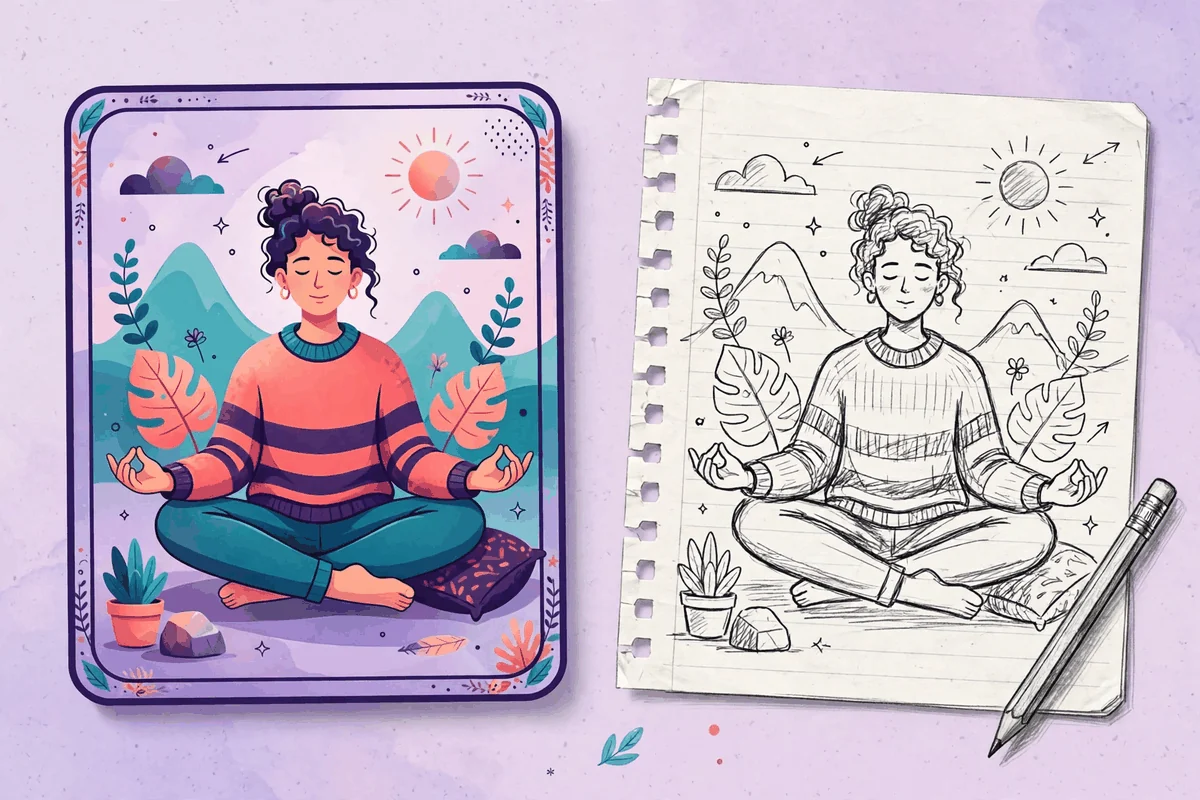
This is the most visible difference in the unDraw vs Open Doodles comparison, and for many projects it decides the question before the license is even opened. unDraw artwork looks like it was art directed for a software company: flat color, clean geometry, complete environments with furniture, devices and backgrounds. It reassures. It fits pricing pages, dashboards, onboarding flows and any context where looking established matters.
Open Doodles looks like a talented friend sketched in your notebook during the meeting. The line wobbles on purpose, the figures are expressive and a little goofy, and there is no environment around them at all. It charms. It fits blogs, newsletters, community projects, event pages, teaching materials and brands that would rather feel human than corporate. Neither look is better, but they are almost impossible to confuse, and choosing the wrong one for your audience is a more expensive mistake than any license term in this comparison. A useful test: imagine the artwork on the most serious page of your project, such as a payment screen or an annual report. If the sketch still works there, Open Doodles is viable everywhere. If it does not, unDraw's polish is the safer system.
License compared: a custom license versus CC0
Both libraries allow commercial use with no attribution, and that is where the resemblance ends. unDraw's license is a permission with boundaries. You may use the artwork freely inside your projects, but the files remain the creator's work, and the license specifically withholds the rights to build competing services from them, redistribute them in packs, and feed them to AI training.
CC0 is not a permission at all. It is a dedication: the creator waives copyright and related rights to the greatest extent the law allows, so the work can be copied, edited, remixed, shared or redrawn for any purpose without restriction under copyright or database law, in the Open Doodles About page's own summary. Concretely, that means the things unDraw forbids are on the table here. You can print a doodle on a shirt and sell the shirt. You can include doodles in a template or a resource pack you distribute. You can redraw one and call the result your own illustration. Two cautions keep this honest. First, CC0 waives copyright only; it does not grant trademark rights, so treat any recognizable brand elements with the same care you would anywhere. Second, a waiver cannot be taken back, but it also cannot give you exclusivity. The doodle on your shirt can appear on anyone else's shirt tomorrow, legally.
There is also a workflow consequence. With unDraw, keeping a copy of the license with your project files is good practice, because your rights flow from it. With Open Doodles, the equivalent habit is saving a note that the set is CC0, since future teammates may not believe artwork this usable is really unrestricted. And if your project mixes both libraries, track which file came from where, because the same page can hold an illustration you may redistribute and one you may not. Our guide to organizing your downloaded unDraw files shows a filing pattern that keeps those distinctions intact.
Which library should you choose?
- A SaaS product, agency site or client deliverable: choose unDraw. Complete scenes, brand color control and terms written for exactly this work.
- Merchandise, print on demand or products for resale: choose Open Doodles. CC0 places no copyright barrier in your way, while unDraw's license keeps its artwork from being the center of a product.
- Templates, UI kits or resources you will redistribute: choose Open Doodles, and keep the CC0 note with the files so your buyers understand their rights.
- A playful personal brand, blog or community project: choose Open Doodles if the sketch voice fits, and enjoy the simplest rights situation in illustration.
- A hero section that must carry a landing page: choose unDraw. Its scenes are composed to fill that space; a lone doodle usually cannot.
- Learning or remixing as the goal: choose Open Doodles and download the source files. The set was published partly as a teaching resource, layers and all.
Frequently asked questions
Is Open Doodles really free for commercial use?
Yes. The set is released under CC0, and its About page states that you can copy, edit, remix, share or redraw the images for any purpose without restriction under copyright or database law. Commercial use is one of those purposes, and no attribution is required.
Can I sell products with Open Doodles on them?
Under copyright law, yes, because CC0 waives the rights that would otherwise stop you. What CC0 does not give you is exclusivity or trademark rights, so the same doodle may appear on other people's products, and you should not present a doodle as your registered brand mark.
Can I edit the doodles?
Yes, in any way you like. Download the SVG or the source files and rework them, or use the Edit in Blush links on the site to open a doodle in Blush and compose it with other elements. Editing unDraw files is also allowed, within its license, as our guide to editing an unDraw SVG in Inkscape demonstrates.
Why would anyone choose unDraw if CC0 is freer?
Because freedom is only one variable. unDraw offers far more scenes, complete compositions, consistent professional polish and a color workflow built for brands. Most projects never touch the edges where CC0's extra rights matter, and for those projects the artwork itself is the deciding factor.
Sources and further reading
- unDraw license, the full official license text.
- unDraw, the official library and its search, recolor and download workflow.
- Open Doodles, the official set with its SVG, PNG and GIF downloads.
- Open Doodles About, the creator's explanation of the CC0 dedication, the source files and how the set was made.